 pelmet
Download
Pelmet / Lock screen
The song stays on the lock screen.
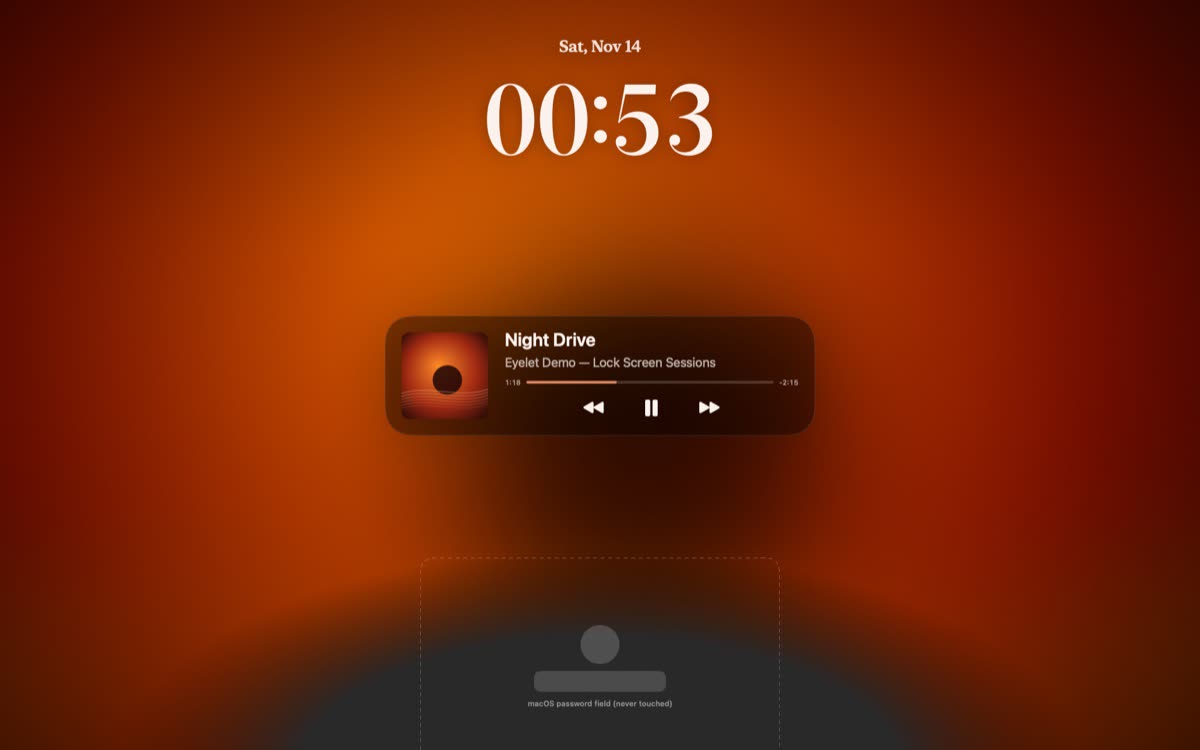
Pelmet puts the song that is playing on the Mac lock screen: its cover, its title, play, pause and skip controls, and time-synced lyrics. It works with Spotify and Apple Music on macOS 14 or later. The password field stays macOS’s own, and what you type goes to macOS.
Updated
At a glance
- Music apps
- Spotify and Apple Music
- On screen
- The cover, the song, its controls, the lyrics and a clock
- Opens on
- The song card, a big cover, or the lyrics
- Backgrounds
- Flowing colours, Blurred, Cover and Aura
- Password
- The macOS field, untouched. Your keys go to macOS.
- Preview
- A live preview in Pelmet’s settings, without locking the Mac
- Sounds
- A sound when the Mac locks and unlocks
- Price
- $6.99 once, for two Macs. Three-day free trial with no card and no account. 14-day refund.
What shows while the Mac is locked
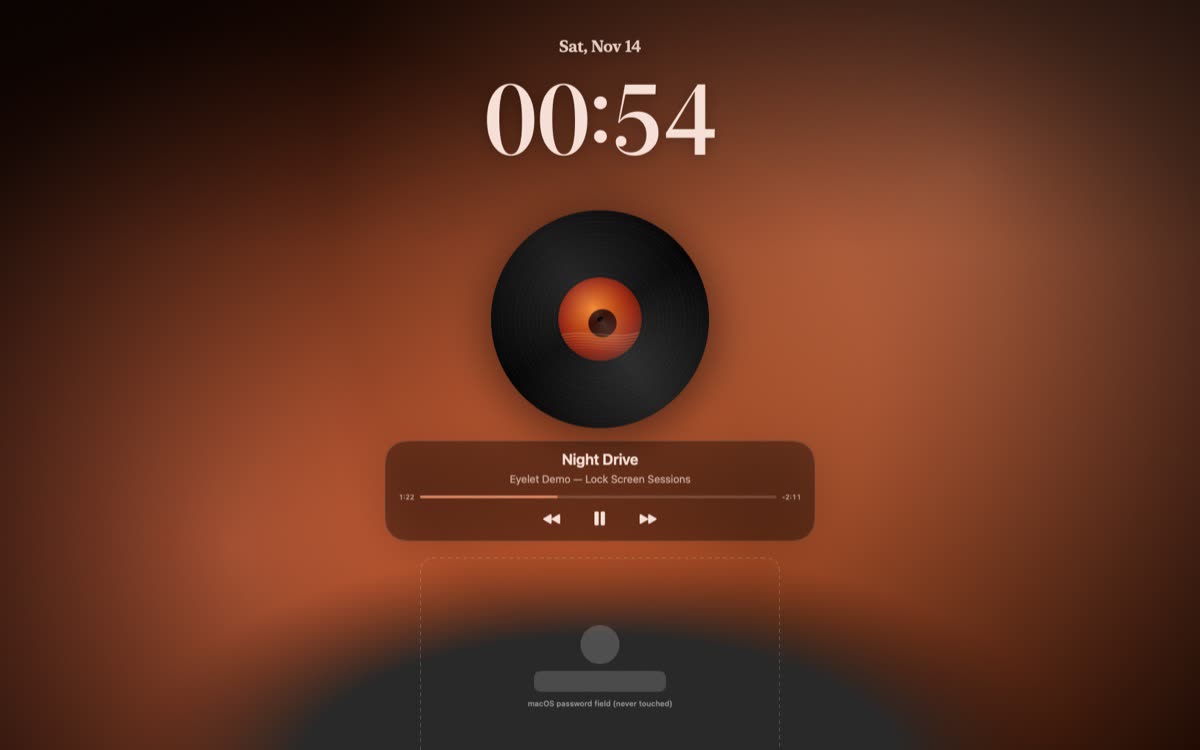
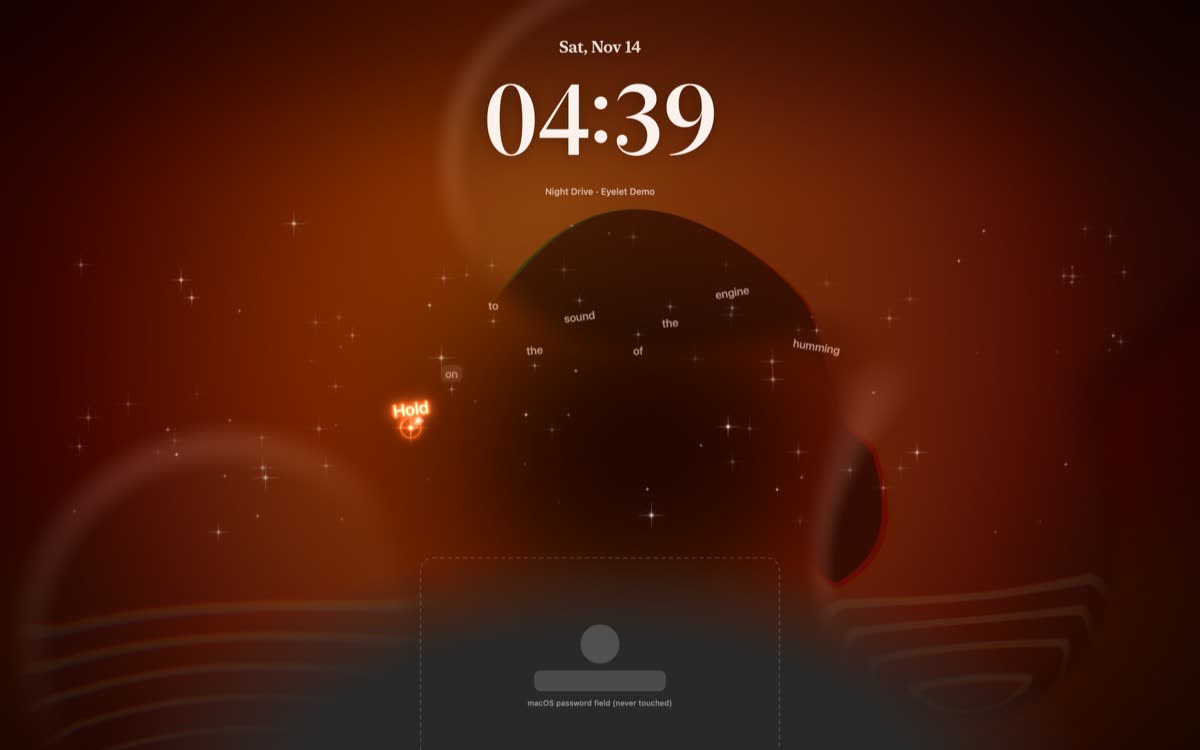
When you lock the Mac with music playing, Pelmet shows a card for the song: the cover, the title and the play, pause and skip buttons. The lyrics run along with it, time-synced to the song. Pelmet draws its own clock for the scene.
You can also have it open on a big cover, or on the lyrics first, and put a spinning record above the card.
Four backgrounds
Flowing colours
The default. The colours of the cover, flowing slowly into each other. With Reduce Motion on, they hold still.
Blurred
The cover of the song, blurred, as the wallpaper.
Cover
The album’s cover, still.
Aura
Only the cover’s colours, as a soft moving light.
Pelmet’s settings show a live preview of the lock screen, so you can try each one without locking the Mac.
Your password stays with macOS
Pelmet does not make a password field of its own. The field is the one macOS uses, and Pelmet’s windows on the lock screen never take keystrokes, so what you type goes to macOS as it always does.
Questions
Can I control music from the Mac lock screen?
Yes, with Pelmet. Its lock screen card has play, pause and skip controls for Spotify and Apple Music, next to the cover and the lyrics.
Can I see lyrics on the Mac lock screen?
Yes. Pelmet shows time-synced lyrics on the lock screen, and you can set it to open on the lyrics first.
Does Pelmet replace the macOS password field?
No. The password field is macOS’s own. Pelmet’s windows on the lock screen never take keystrokes, so what you type goes to macOS.
Which backgrounds are there?
Four: Flowing colours (the default), Blurred, Cover and Aura. All four are made from the cover of the song that is playing.
Does it work on a Mac without a notch?
Yes. Pelmet runs on any Mac with macOS 14 or later, notch or not.
How much does it cost?
$6.99 once, for two Macs. Try everything free for three days first; no card and no account.
More about Pelmet
- Live lyricsTime-synced lyrics for Spotify and Apple Music in the notch, on the desktop, on the lock screen and full screen.
- Cover wallpapersA Mac wallpaper made from the album cover, that changes with the song.
- FeaturesEvery feature in one list, with what each one needs.
- FAQPrice, trial, Macs, music apps, lyrics and privacy, answered.
- PelmetThe home page: the island, lyrics, lock screen, shelf and price.
Get Pelmet
Try it free for three days.
Every feature, no card and no account. After that, Pelmet is $6.99 once, for two Macs, with every update included.
macOS 14 or later · Spotify and Apple Music · 14-day refund